> ## Documentation Index
> Fetch the complete documentation index at: https://docs.gocertify.me/llms.txt
> Use this file to discover all available pages before exploring further.

# On Site Messaging

> Start building loyal communities with targeted, gated offers.

On-site messaging (OSM) is a powerful way to drive conversions by surfacing offers directly on product/checkout pages, maximising conversion of high intent shoppers.
No additional development work is needed to add OSM to your site as long as the [head script](section/gettingStarted/integrateOnSite) has already been installed.

## Types of on-site messaging

Out of the box, Gocertify supports three main types of on-site messages, but with heavy customisation available you can build a tailored placement that meets your needs.

<CardGroup cols={3}>
  <Card title="In-line" href="/section/promoteOffers/inlinePlacementOSM" img="https://mintcdn.com/gocertify-db9cc6b8/XUb6vbj2nTBva5Hn/images/osm/inlinePlacementOSM.png?fit=max&auto=format&n=XUb6vbj2nTBva5Hn&q=85&s=5c8bb38869596255a852023c6bfec9c8" width="1020" height="504" data-path="images/osm/inlinePlacementOSM.png">
    Display rewards directly on product/checkout pages, maximising conversion of high intent shoppers.
  </Card>

  <Card title="Sticky Bar" href="/section/promoteOffers/stickyBarOSM" img="https://mintcdn.com/gocertify-db9cc6b8/XUb6vbj2nTBva5Hn/images/osm/stickyBarOSM.png?fit=max&auto=format&n=XUb6vbj2nTBva5Hn&q=85&s=888c435be96e28264eec402976b5e510" width="1020" height="504" data-path="images/osm/stickyBarOSM.png">
    Display rewards from a prominent sticky bar at the top or bottom of your site. Highly visible and no-dev installation.
  </Card>

  <Card title="Floating Button" href="/section/promoteOffers/floatingButtonOSM" img="https://mintcdn.com/gocertify-db9cc6b8/XUb6vbj2nTBva5Hn/images/osm/floatingButtonOSM.png?fit=max&auto=format&n=XUb6vbj2nTBva5Hn&q=85&s=3979b6f51827b267735bef4d36b426a2" width="1024" height="506" data-path="images/osm/floatingButtonOSM.png">
    Display a hovering trigger that floats above the page content. Highly visible and no-dev installation.
  </Card>
</CardGroup>

## Managing on-site messaging

<Tip>
  Your on-site messages will only show if there are live offers available for the shopper. While your brand is still in setup you may not see your on-site messages.
</Tip>

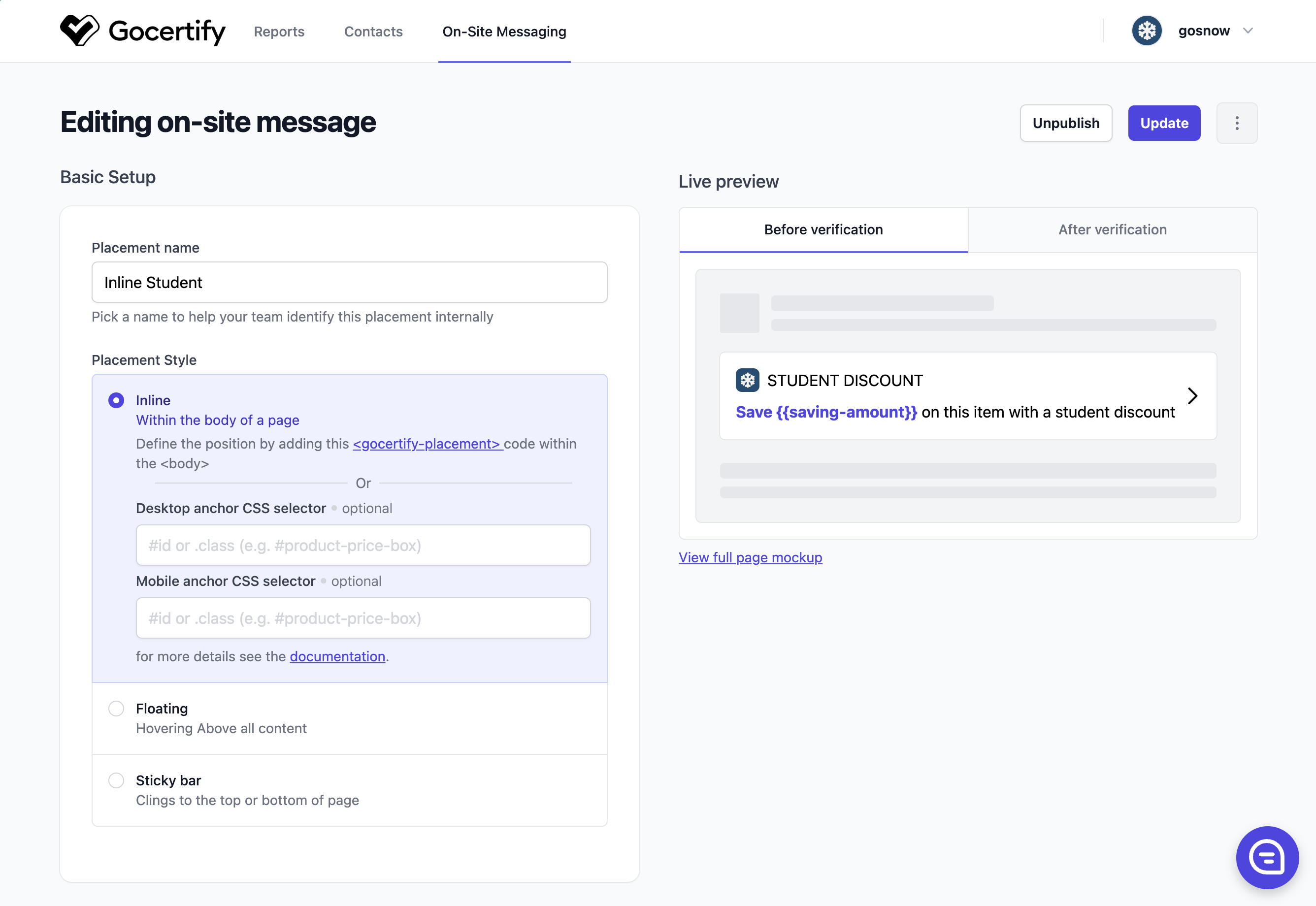
You have full control of all your on-site messages via the [Gocertify dashboard](https://secure.gocertify.me/dashboard), including creating new placements, editing content and setting visibility rules.
<Frame>
  <img className="block dark:hidden" src="https://mintcdn.com/gocertify-db9cc6b8/XUb6vbj2nTBva5Hn/images/other/Dashboard-OSM.png?fit=max&auto=format&n=XUb6vbj2nTBva5Hn&q=85&s=880e25bbe3e4eb891fdcde415e0ba156" alt="Client Dashboard Screenshot" width="2672" height="1840" data-path="images/other/Dashboard-OSM.png" />

  <img className="hidden dark:block" src="https://mintcdn.com/gocertify-db9cc6b8/XUb6vbj2nTBva5Hn/images/other/Dashboard-OSM.png?fit=max&auto=format&n=XUb6vbj2nTBva5Hn&q=85&s=880e25bbe3e4eb891fdcde415e0ba156" alt="Client Dashboard Screenshot" width="2672" height="1840" data-path="images/other/Dashboard-OSM.png" />
</Frame>

## Previewing your placement

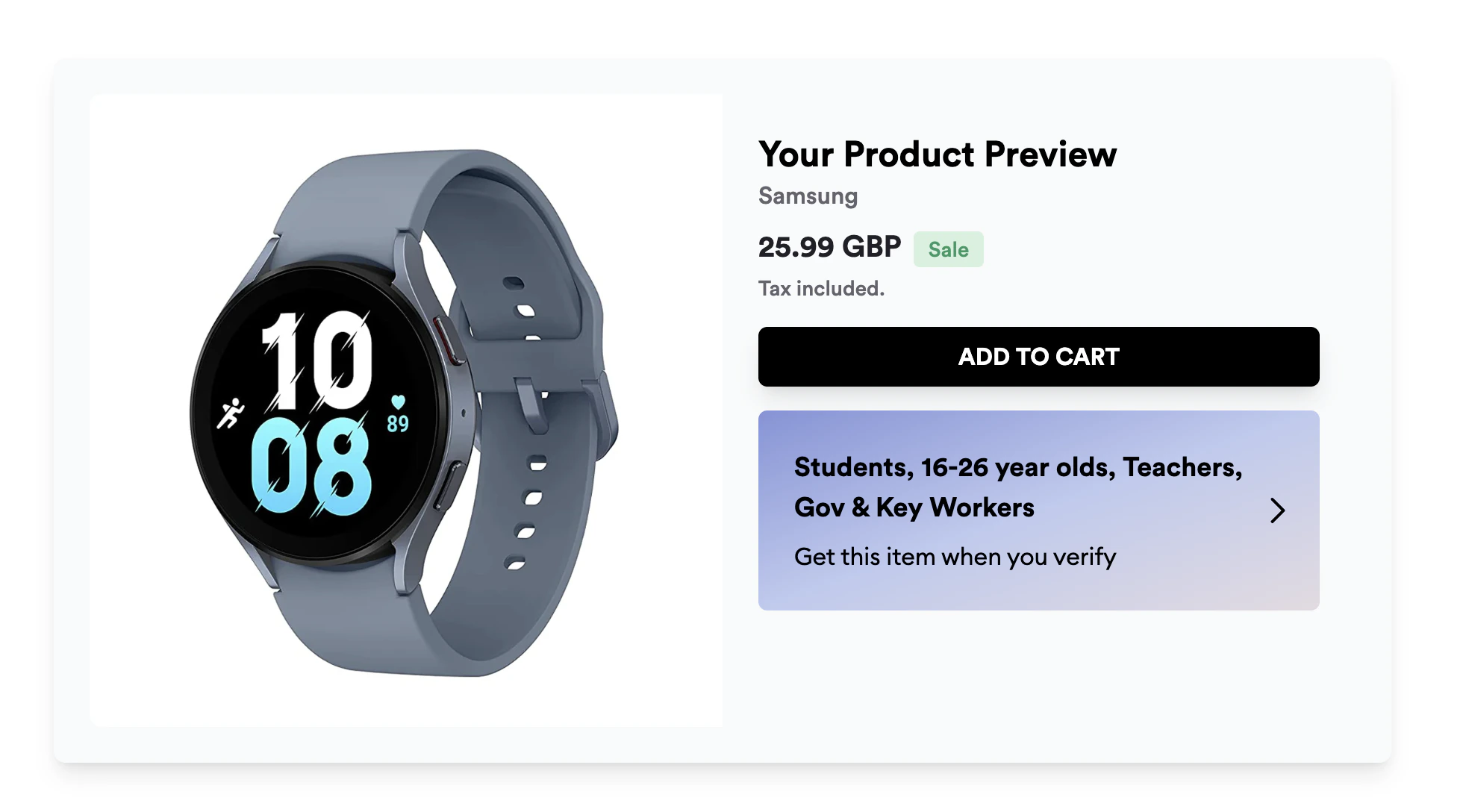
When editing an on-site message, click **View full page mockup** in the Live preview section to see how your placement will appear on a product page.
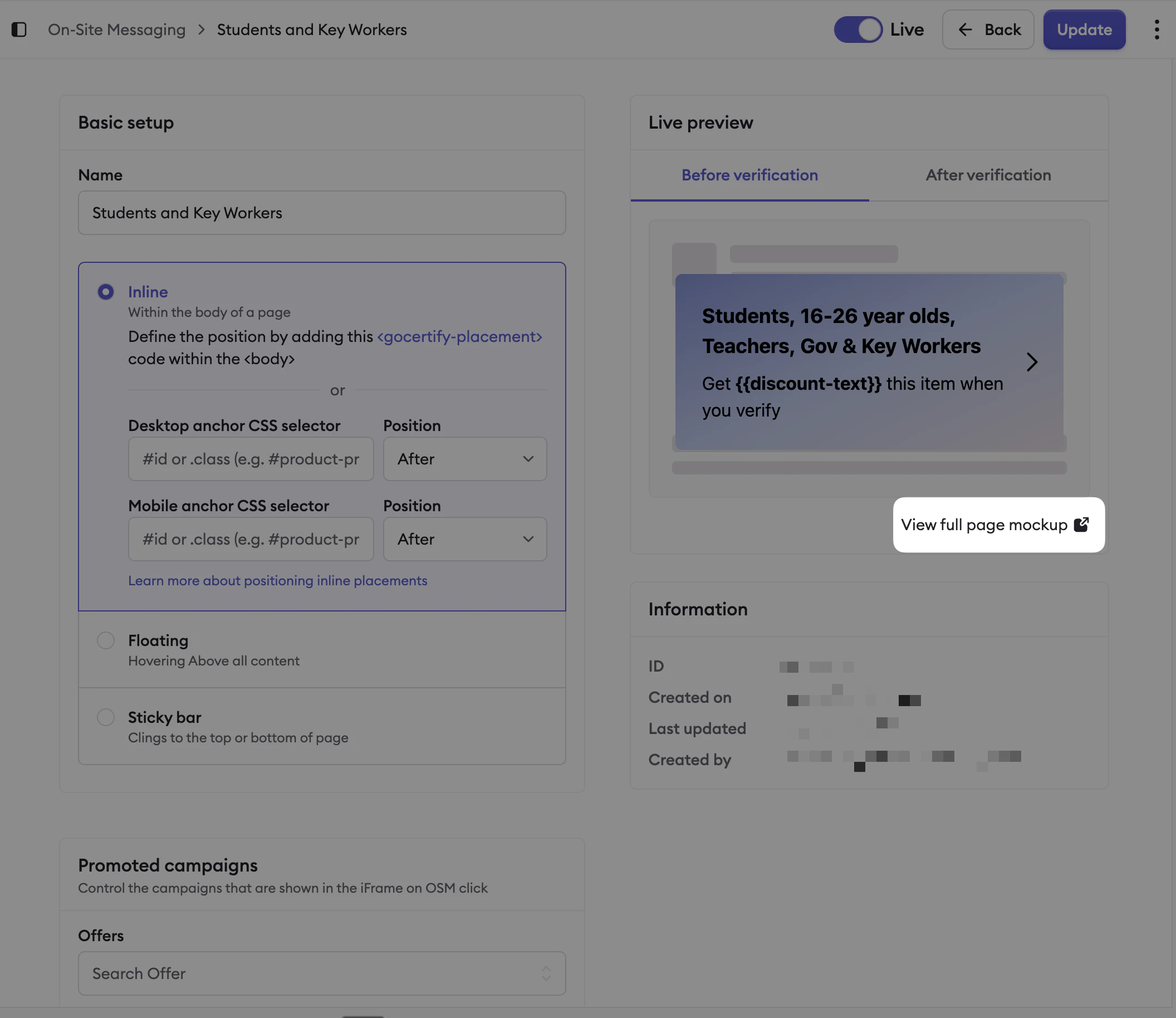
<Frame caption="Click 'View full page mockup' to preview your placement.">
  <img src="https://mintcdn.com/gocertify-db9cc6b8/tzrtqLWVQdKRt_7g/images/osm/osm-editor-view-mockup.png?fit=max&auto=format&n=tzrtqLWVQdKRt_7g&q=85&s=ce556cbf9529478d489383fa610f380d" alt="OSM editor with View full page mockup button" width="2112" height="1828" data-path="images/osm/osm-editor-view-mockup.png" />
</Frame>

<Frame caption="The full page mockup shows how your placement will render.">
  <img src="https://mintcdn.com/gocertify-db9cc6b8/tzrtqLWVQdKRt_7g/images/osm/osm-full-page-mockup.png?fit=max&auto=format&n=tzrtqLWVQdKRt_7g&q=85&s=6eb4984e6449c2feeed8012d68eea28e" alt="Full page mockup preview" width="1964" height="1088" data-path="images/osm/osm-full-page-mockup.png" />
</Frame>
