> ## Documentation Index
> Fetch the complete documentation index at: https://docs.gocertify.me/llms.txt
> Use this file to discover all available pages before exploring further.
# Customise Branding
> Convert shoppers with targeted, gated offers.
A crucial part of your reward flow is its branding. This is the first thing your users will see,
and it's important to make sure that the shopper experience closely aligns with your brand guidelines.
In this section we will explore how how you can customise the visuals, copy and styling of your reward flow to make sure it's a perfect fit for your brand. The branding you
create will be applied to all of your reward flows, so it's a great way to build consistency across your campaigns.
 ## Customise your visuals
#### Favicon, Logo and Banner Image
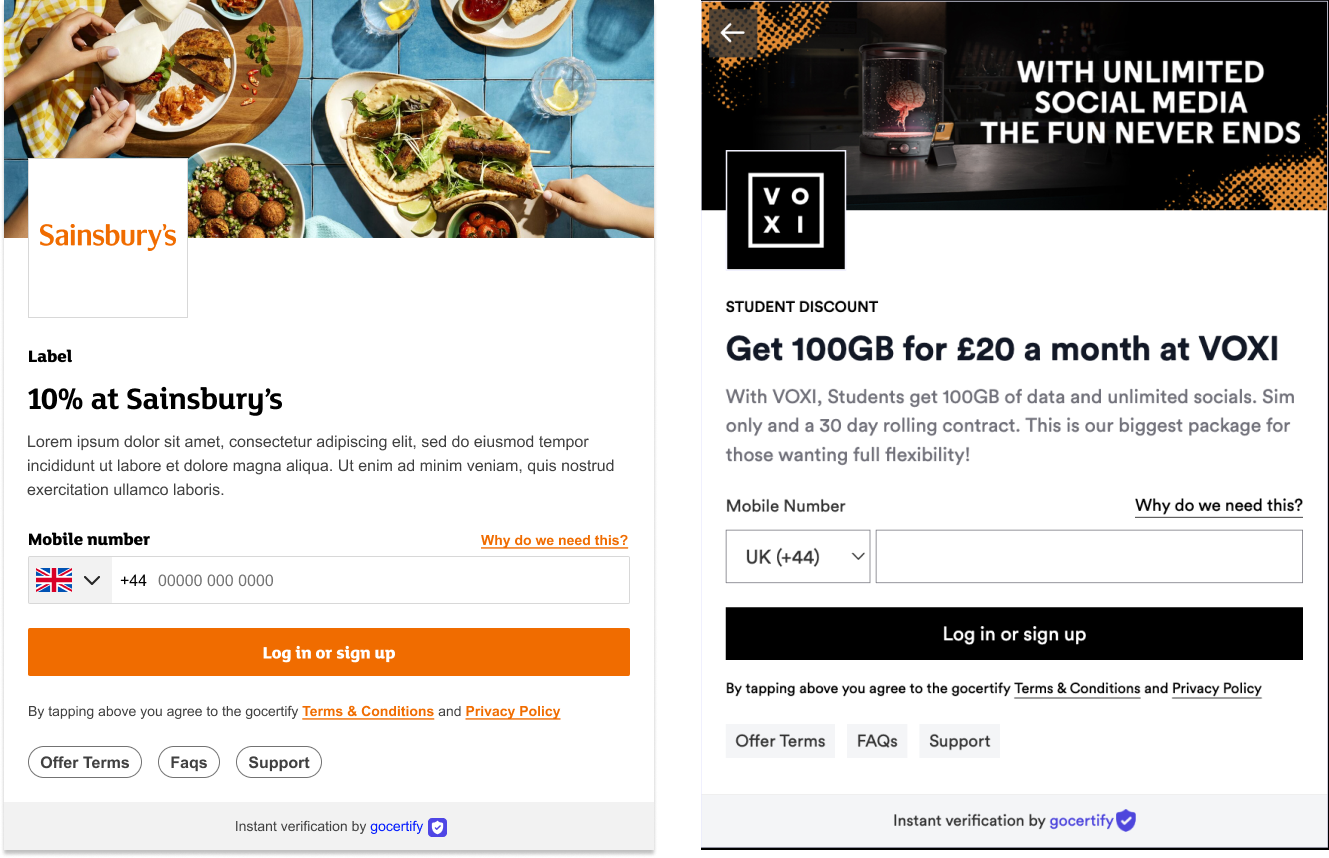
The brand logo and banner image is shown on the key screens throughout the reward flow and the favicon is shown on any
[Gocertify hosted](https://secure.gocertify.me/at/gosnow) landing pages that you may link to.
Provide your Gocertify account manager with the image files of the correct dimensions (listed below), and we will handle the rest.
## Customise your visuals
#### Favicon, Logo and Banner Image
The brand logo and banner image is shown on the key screens throughout the reward flow and the favicon is shown on any
[Gocertify hosted](https://secure.gocertify.me/at/gosnow) landing pages that you may link to.
Provide your Gocertify account manager with the image files of the correct dimensions (listed below), and we will handle the rest.


 #### Fonts
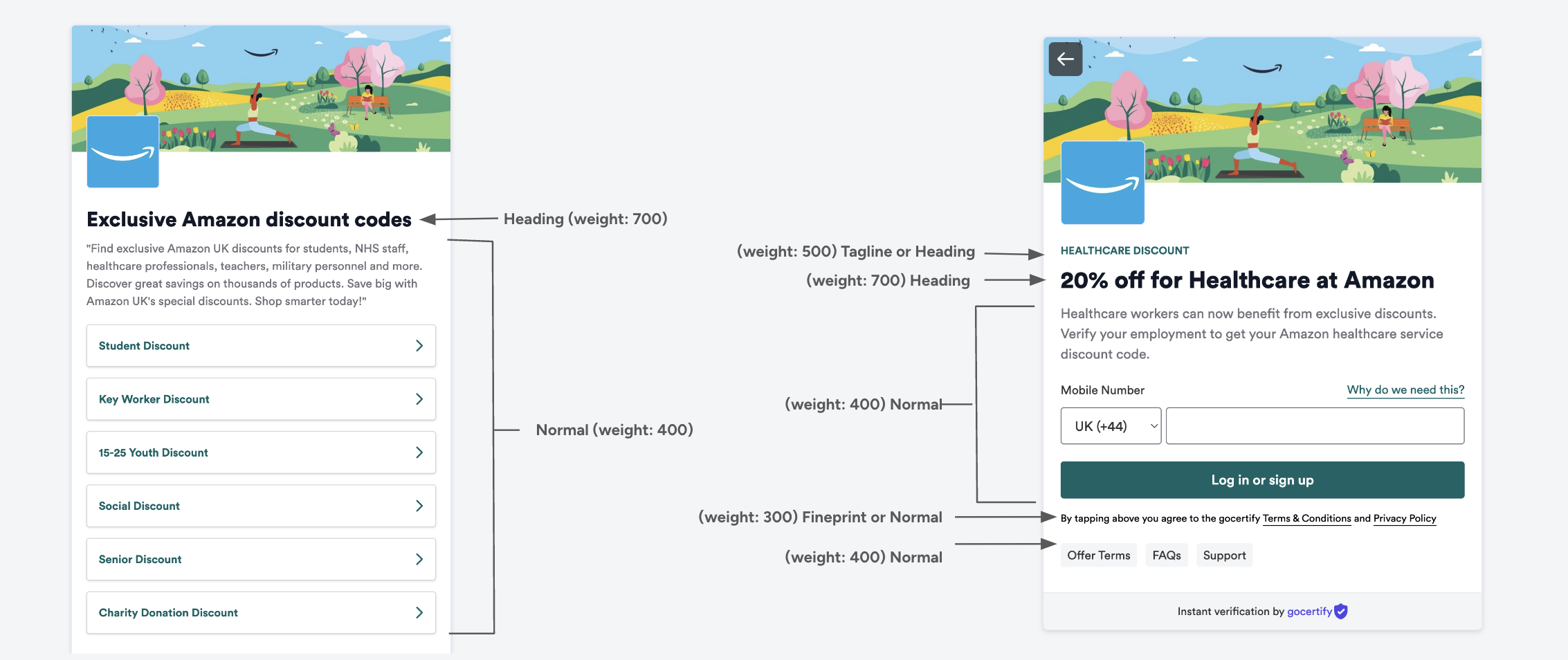
You can provide up to 4 font files to customise the heading, normal, tagline and fineprint text. These fonts will be applied throughout the reward flow as detailed below:
#### Fonts
You can provide up to 4 font files to customise the heading, normal, tagline and fineprint text. These fonts will be applied throughout the reward flow as detailed below:
 #### Custom Styling
The Advanced CSS option let's you can go even further with your customisation. Your customer success manager will be able to help you build and apply any customisations you need, but for inspiration the most popular customisations are captured below. The [Advanced CSS](/section/gettingStarted/advancedCss) section has even more examples.
```css theme={null}
.in-iframe .logo-block-pushed-up {
display: none;
}
```
```css theme={null}
.in-iframe .banner-section a {
display: none;
}
```
```css headings theme={null}
/* Applies styles to the heading text. */
.heading {
text-transform: uppercase;
font-weight: 700;
font-style: normal;
font-size: 28px;
color: rgb(0, 0, 0);
}
```
```css paragraph theme={null}
/* Applies styles to the subtitle text. */
.paragraph {
font-family: "Roboto Condensed", sans-serif !important;
font-weight: 400;
font-style: normal;
font-size: 16px;
color: rgb(0, 0, 0);
}
```
#### Custom Styling
The Advanced CSS option let's you can go even further with your customisation. Your customer success manager will be able to help you build and apply any customisations you need, but for inspiration the most popular customisations are captured below. The [Advanced CSS](/section/gettingStarted/advancedCss) section has even more examples.
```css theme={null}
.in-iframe .logo-block-pushed-up {
display: none;
}
```
```css theme={null}
.in-iframe .banner-section a {
display: none;
}
```
```css headings theme={null}
/* Applies styles to the heading text. */
.heading {
text-transform: uppercase;
font-weight: 700;
font-style: normal;
font-size: 28px;
color: rgb(0, 0, 0);
}
```
```css paragraph theme={null}
/* Applies styles to the subtitle text. */
.paragraph {
font-family: "Roboto Condensed", sans-serif !important;
font-weight: 400;
font-style: normal;
font-size: 16px;
color: rgb(0, 0, 0);
}
```