> ## Documentation Index
> Fetch the complete documentation index at: https://docs.gocertify.me/llms.txt
> Use this file to discover all available pages before exploring further.
# Discounts
> Convert shoppers with targeted, gated rewards.
Discounts are the most common reward type used by brands, and can be used to convert shoppers with monetary (£) or percentage off (%) incentives. If you'd
rather provide secure access to a storefront with the discounts pre-applied, you can use our [Gated Content](/section/buildRewardFlows/gatedContent) reward type instead.
We recommend adding a prefix e.g. HEALTH-20 for Healthcare Workers - so you can run personalisation for each group using your CRM / CDP
## Unique codes
Unique, or single-use codes let you give every shopper a different discount code. We require a CSV of these codes or can integrate directly with your
preferred ecommerce platform or promotion service.
Provide us with a single column CSV of discount codes.
Install the [Gocertify Shopify app](/section/gettingStarted/integrateOnSite#shopify) by requesting a link from your Gocertify account manager.
Create a discount in Shopify and name it using the following convention: `GC-campaignSlug-discountPercentage`, i.e. `GC-keyWorkers-20` for a 20% discount targeted at key workers.
* Check the option `Limit the number of times this discount code can be used` and set it to `1`.
* Leave the `Limit to one use per customer` option unchecked.
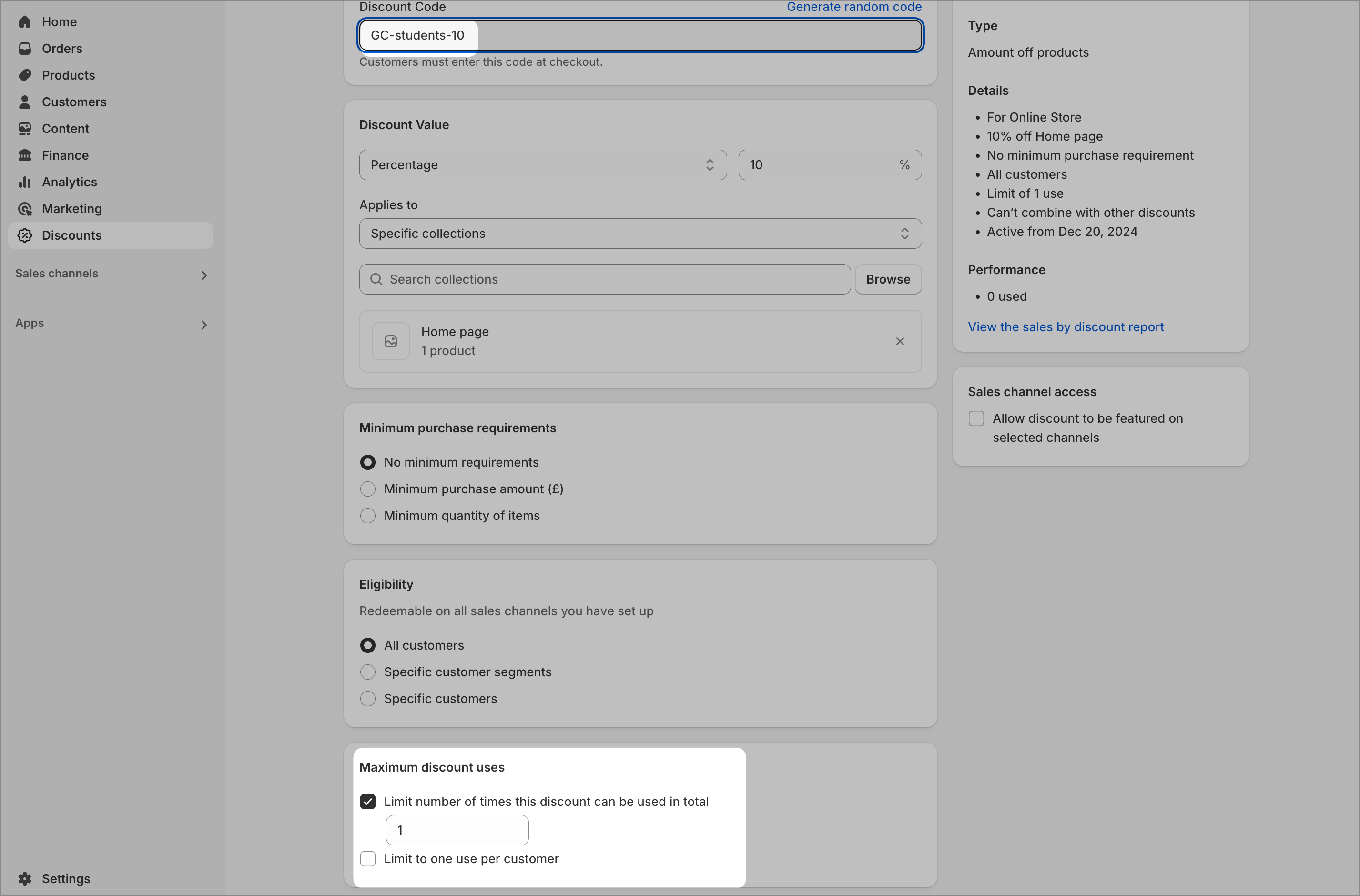 You do not need to enable the embed script again if you have already added this through another method and only want to integrate the discount feed.
Provide us with your Uniqodo `API key` and `offer ID` (e.g. 9384) and we'll automatically add codes to your campaign. You can also upload a CSV of discount codes as a fallback.
We can fetch codes directly from your affiliate network offer feed.
## Multi-use (generic) codes
Multi-use codes, also known as generic or vanity codes, let you give every shopper of the same campaign the same discount code e.g. `SAVE20`. To avoid leakage, where codes are shared outside of your expected channels, we recommend making these codes distinct and unique to your campaign. Provide us with the code and we'll apply it to your campaign.
You do not need to enable the embed script again if you have already added this through another method and only want to integrate the discount feed.
Provide us with your Uniqodo `API key` and `offer ID` (e.g. 9384) and we'll automatically add codes to your campaign. You can also upload a CSV of discount codes as a fallback.
We can fetch codes directly from your affiliate network offer feed.
## Multi-use (generic) codes
Multi-use codes, also known as generic or vanity codes, let you give every shopper of the same campaign the same discount code e.g. `SAVE20`. To avoid leakage, where codes are shared outside of your expected channels, we recommend making these codes distinct and unique to your campaign. Provide us with the code and we'll apply it to your campaign.